# 3 - Corrimiento de Bits
> **MPLAB X IDE - PIC Assembler**
>
> [**PIC18F4550 / PIC18F45K50**](https://docs.microside.com/practicas/mplab-x-ide/mpasm-compiler/pic18f4550-or-pic18f45k50)
## **Introducción**
En esta práctica se implementa un corrimiento de bits, el cual se despliega a través de LEDs.
## **Descripción**
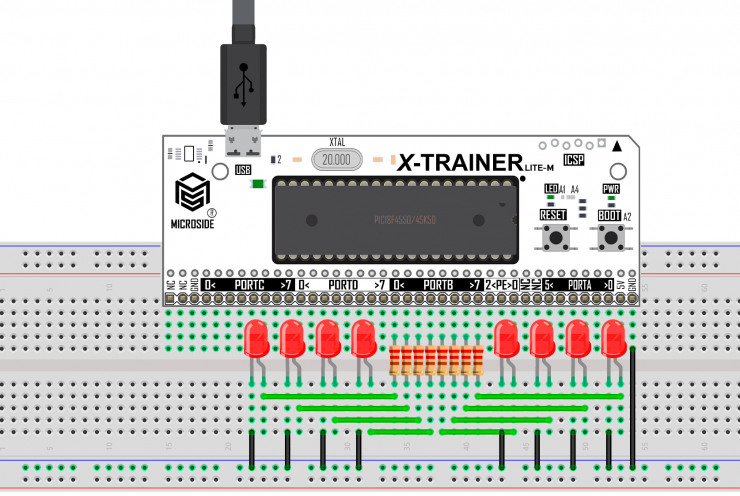
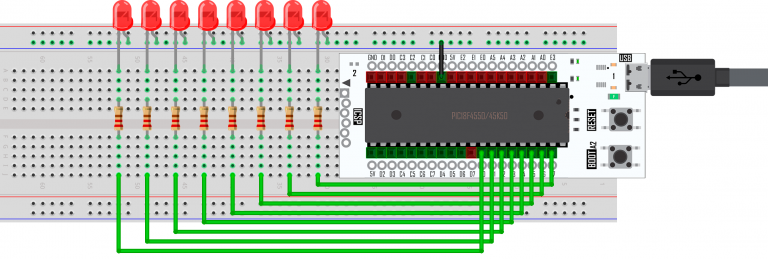
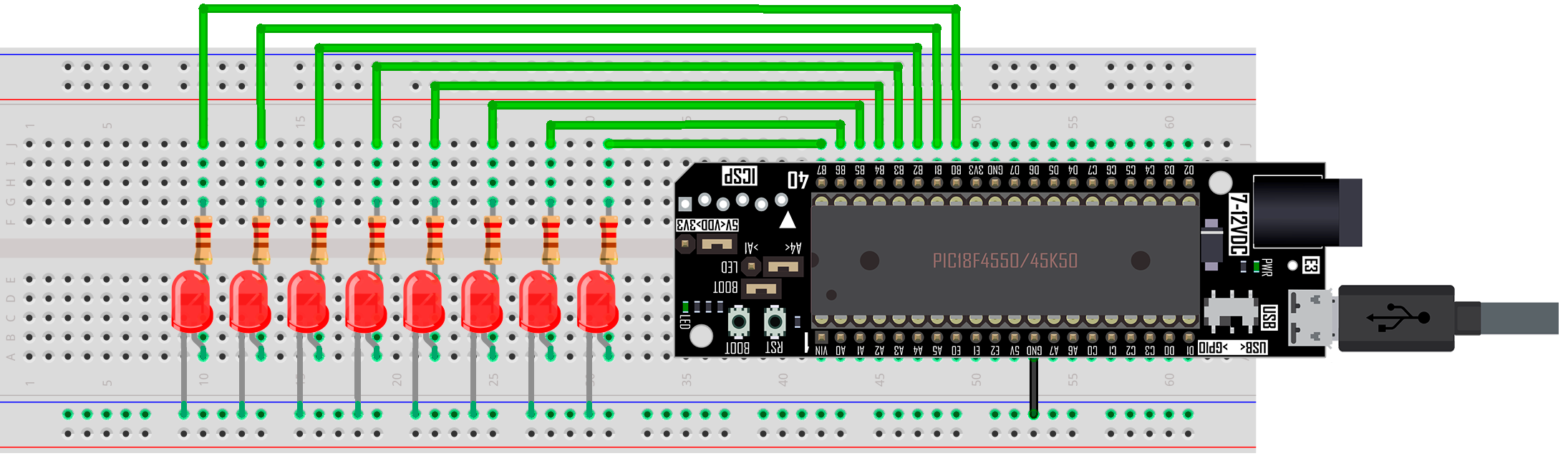
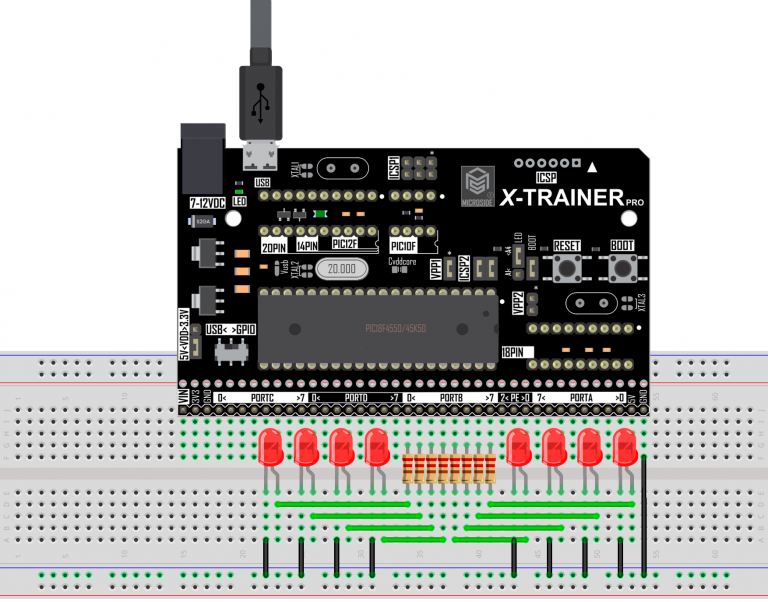
En esta práctica se implementa un corrimiento de bits usando la tarjeta **X-TRAINER** con el **PIC18F4550/PIC18F45K50**. Para visualizar el resultado se conectan 8 LEDs al puerto B de la tarjeta **X-TRAINER.**
**Materiales:**
1 x Tarjeta **X-TRAINER**. [**Manuales**](https://docs.microside.com/tarjetas-de-desarrollo/x-trainer) | [**Comprar**](https://www.microside.com/shop/category/entrenadores-pic-1)
8 x Resistencias 220 ohms.
8 x LEDs.
1 x Protoboard de 830 puntos.
1 x Juego de cables Dupont.
1 x Cable micro USB.
**Software:**
Windows 8.1 o posterior.
MPLAB X IDE v5.35. [**Descarga**](https://www.microchip.com/en-us/tools-resources/archives/mplab-ecosystem)
X-TRAINER Suite v1.0 [**Descarga**](https://raw.githubusercontent.com/MICROSIDE-TECHNOLOGY/microside_download_archive/main/Tools/X-TRAINER%20Suite/X-TRAINER%20Suite%20Setup.zip)
{% hint style="warning" %}
**Nota**: Asegúrate de instalar la versión de **MPLAB X IDE** antes mencionada, de lo contrario es posible que surjan errores.
{% endhint %}
## **Procedimiento**
**1.** En el apartado de “[**Diagrama Esquemático**](#diagrama-esquematico)” selecciona el modelo de tu tarjeta, realiza las conexiones que se muestran en la imagen y conéctala a la computadora.
{% hint style="info" %}
Las conexiones mostradas en los diagramas esquemáticos son las mismas ya sea que la tarjeta **X-TRAINER** posea el **PIC18F4550** o el **PIC18F45K50**.
{% endhint %}
**2.** Ejecuta **MPLAB X IDE** y crea un nuevo proyecto con el código fuente que se encuentra en el apartado "[**Código**](#codigo)".
**3.** Compila el proyecto
{% hint style="success" %}
Para compilar el proyecto dirígete a la barra de herramientas superior y da clic en el icono señalado.
{% endhint %}
**4.** Abre el **Software X-TRAINER Suite v1.0** en el apartado **PIC18F4550/45K50**, selecciona el archivo .hex generado al compilar el proyecto y programa la tarjeta.
{% hint style="success" %}
Si tienes dudas de cómo realizar los pasos anteriores puedes encontrar un manual del **Software X-TRAINER Suite v1.0**. a través del siguiente[ **link**](https://docs.microside.com/tarjetas-de-desarrollo/software-x-trainer-suite).
{% endhint %}
**5.** Al terminar de programar, la tarjeta **X-TRAINER** se reiniciará automáticamente y se ejecutará el programa de esta práctica.
## **Diagrama esquemático**
Selecciona el modelo de tu tarjeta **X-TRAINER.**
{% tabs %}
{% tab title="LITE M R2" %}
{% endtab %}
{% tab title="LITE M R3" %}
{% endtab %}
{% tab title="LITE F" %}
{% endtab %}
{% tab title="DIP" %}
{% endtab %}
{% tab title="DIP R3" %}
{% endtab %}
{% tab title="PRO R2" %}
{% endtab %}
{% tab title="PRO R3" %}
{% endtab %}
{% tab title="PRO R4" %}
{% endtab %}
{% endtabs %}
## **Código**
{% tabs %}
{% tab title="PIC18F4550" %}
{% embed url="https://gist.github.com/microside-mx/68613061a2c37611b235c63a43954f91" %}
{% endtab %}
{% tab title="PIC18F45K50" %}
{% embed url="https://gist.github.com/microside-mx/d55b01182166dcce48cd37303ae3dbef" %}
{% endtab %}
{% endtabs %}
## **Descargas**