> For the complete documentation index, see [llms.txt](https://docs.microside.com/llms.txt). Markdown versions of documentation pages are available by appending `.md` to page URLs; this page is available as [Markdown](https://docs.microside.com/practicas/arduino-ide/13-motor-dc-+-sensor-ir-sharp-gp2y0a21.md).
# 13 - Motor DC + Sensor IR Sharp GP2Y0A21
> **Arduino IDE**
>
> [**UNO / MEGA / NANO**](https://docs.microside.com/practicas/arduino-ide)
## **Introducción**
En esta práctica se implementa el control de un motor de corriente directa, usando los módulos PWM y ADC a través de un sensor SHARP para variar la velocidad. La velocidad del motor, depende de la distancia que haya entre un objeto y el sensor infrarrojo.
## **Descripción**
En esta práctica se realiza el control de velocidad de un motor DC, usando los módulos internos ADC y PWM por medio de un sensor Sharp conectado a las tarjetas **UNO, MEGA** o **NANO**.
#### **Materiales:**
1 x Tarjeta **UNO**, **MEGA** o **NANO.**.
1 x Sensor IR Sharp GP2Y0A21.
1 x Diodo 1N4001.
1 x Transistor NPN 2N3904.
1 x Motor DC 9 a 12 volts.
1 x Juego de cable Dupont.
1 x Protoboard de 830 puntos.
1 x Cable micro USB.
#### **Software:**
Windows 8.1 o posterior.
Arduino® IDE. [**Descarga**](https://www.arduino.cc/en/Main/Software)
## **Procedimiento**
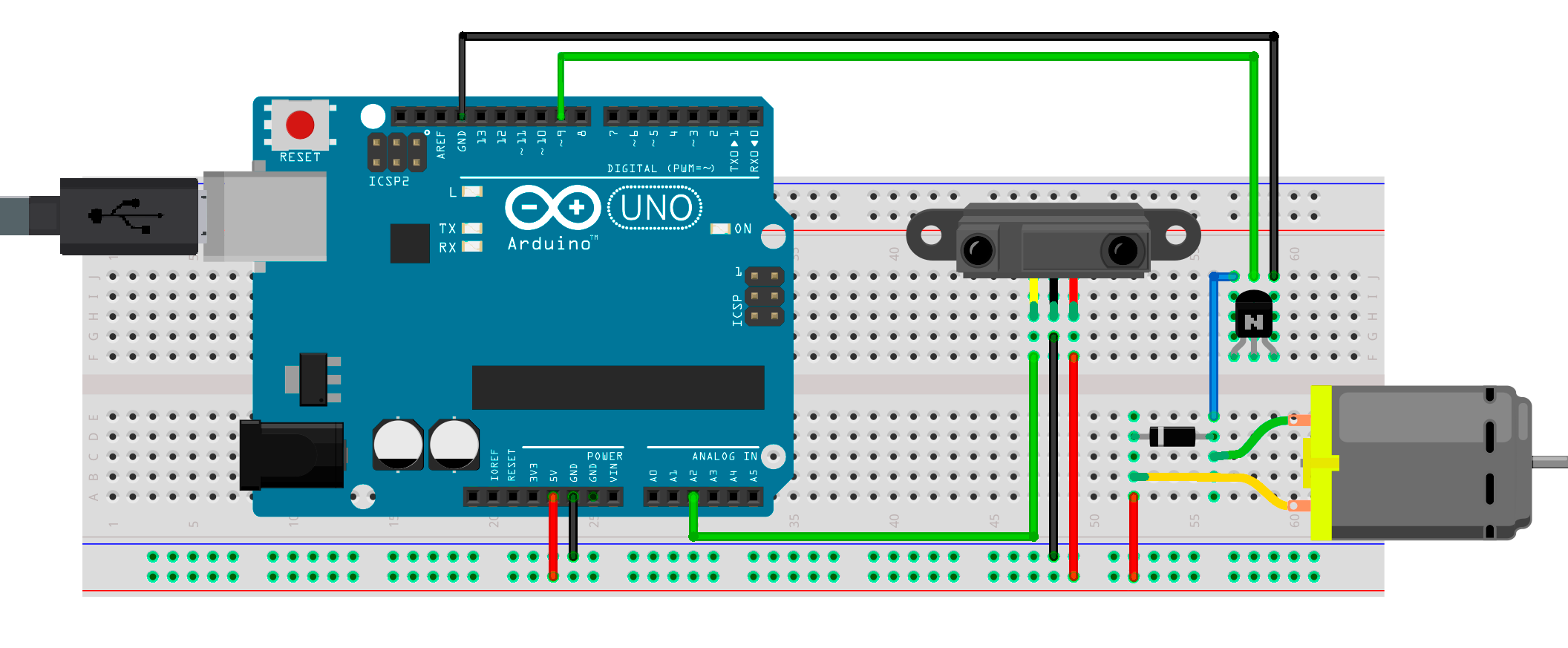
1. En el apartado de “[**Diagrama Esquemático**](#diagrama-esquematico)” selecciona el modelo de tu tarjeta, realiza las conexiones que se muestran en la imagen y conéctala a la computadora.
2. Ejecuta el software **Arduino® IDE**, crea un nuevo proyecto con el código fuente que se encuentra en el apartado "[**Código**](#codigo)" y compila el programa.
{% hint style="success" %}
Si tienes dudas de cómo realizar los pasos anteriores puedes encontrar un manual de **Arduino® IDE** a través del siguiente [**link**](https://docs.microside.com/practicas/ides/arduino-r-ide).
{% endhint %}
3. Al terminar de programar, el módulo se reiniciará y el programa de esta práctica se ejecutará.
## Diagrama esquemático
{% tabs %}
{% tab title="UNO" %}
{% endtab %}
{% tab title="MEGA" %}
{% endtab %}
{% tab title="NANO" %}
{% endtab %}
{% endtabs %}
## Código
{% tabs %}
{% tab title="Proyecto Arduino" %}
{% embed url="" %}
{% endtab %}
{% endtabs %}